


Value Scales Project

WI State Standards:
- AA Cr10h
Investigate: Engage in critical thinking, problem solving, and research through elements and principles of art and design studio practices and processes.
(aesthetics / problem solving) - AA Cr12h
Make: Create works of art that introduce students to media, care of tools, and basic craftsmanship skills.
(skills) - AA Pr10h
Develop meaning: Create s body of work incorporating personal, historical, and contemporary art to communicate one or more points of view.
(aesthetics / communication)
Learning objectives
- graphic problem solving
- planning and executing
- create tonal values
- critical thinking
- using Adobe Illustrator

Value, as an element of Art, refers to lightness and darkness of an area.
How do we measure the differences in light and dark?
The lightest value is white, the darkest value is black
What about the range of values in between?
We use a value scale .
Value scale is a way of describing how values change between black and white
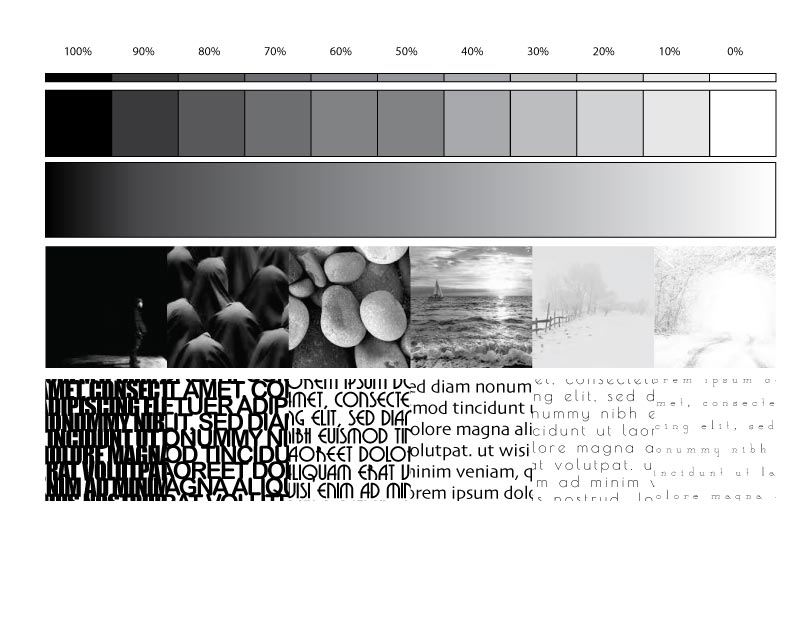
STEPS
Open the work file in Adobe Illustrator.
There are 4 value scales in your work file.
#1 – value scale – 11 blocks

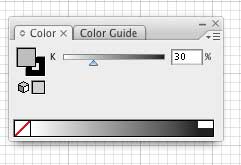
Apply assigned amount of BLACK into each block to create a scale from 100%(black) to 0% (white)
Use Color Palette (Window > Color):
#2 – value scale – gradient

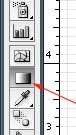
Use the Gradient tool:
Drag right-to-left:

#3 – value scale – black&white photos
Use black and white photos to create a value scale
Use Clipping masks to crop them to select the best part of it to represent a specific value. (Unlock and ungroup the squares)
Use previous value scales as a reference.
#4 – value scale – text
Create text areas. Manipulate text font, size, style, tracking, etc to create an illusion of each value.
Optimize the image and submit!
Good luck!